Wan 3.0 Lip Sync Video
Drop in a face, quote the line, and the mouth follows the words. Wan 3.0 lip sync generates the voice in the same pass as the picture, so there is no audio file to record first and no dubbing pass afterwards. Two to thirty seconds, sound inside the MP4, and your first clip is free.
Alibaba's own Wan 3.0 dialogue demos · Try this loads the prompt
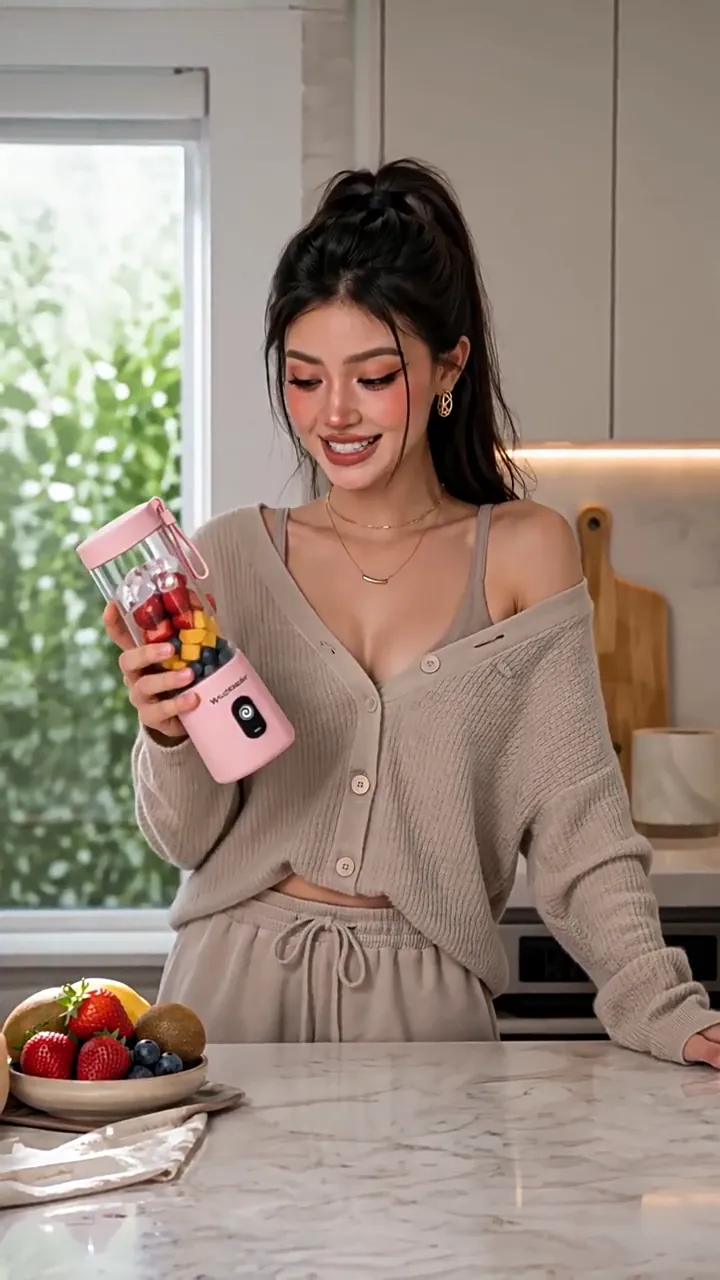
 SPOKEN TO CAMERA · 9:16 · 720P
A piece to camera, six lines long
What Wan 3.0 does when the prompt has a line in it
Every clip here is a demo Alibaba published for Wan 3.0, and each one arrived with the prompt that produced it. Press Hear it for the voice, or Use prompt to load the whole thing into the box at the top of this page — printed in full, in the language it was written in.
- 1 passpicture, speech and mouth movement in one generation
- $0extra for the audio track
- wan3.0-videothe model behind every clip on this band
- ReferenceSix lines to camera, the product held to a reference image
 ReferenceOne singer switching languages, the sync holding through all eight
 ReferenceTwo speakers, Japanese, one line each and no crosstalk
 First frameA still of two animals becomes ten rounds of dialogue
- The words
Quote the exact line. A paraphrase gets a line the model invented.
- Speaker
Pin who is talking — age, hair, clothing — or the wrong mouth moves.
- Camera
Keep it on the face for the length of the line.
- Text
Close with no subtitles, or the line can arrive printed on the frame.
Generate AI lip sync video from simple text prompts
No script format, no timeline, no voice file. Describe the shot in ordinary sentences, quote the words the character says and attribute them to the person on camera, and Wan 3.0 renders the picture, synthesises the voice and moves the mouth to it in a single request.
Medium A-roll. The woman stands behind the kitchen counter
holding the pink portable blender, speaking naturally to camera.
She says: "I get asked how I make smoothies so quickly."
No subtitles, no text overlays, no UI, no watermark.
- Shot, camera, and who is talking
- The quoted line, and what not to print
9:16 · 720P · 30Swan3.0-video · 16:9 · 720P · 14s · speech and mouth in the same pass
Those four lines are lifted from Alibaba's own thirty-second demo, which runs to 2,484 characters against a 20,000-character ceiling. The room is for pinning the speaker, the product and the exclusions — not for writing more. Uploading a portrait instead of describing one changes nothing about how the line itself is written.
Improve your lip sync video prompt
with AI
A run that comes back wrong is almost never a model problem. It is a prompt that named the picture and left the delivery, the camera and the subtitle rule to chance.
The prompt generator takes the line you want said and returns a full Wan 3.0 prompt around it — speaker pinned, one camera move named, the audio layers ranked, and the line delimited so it is performed rather than narrated. It checks the result against the rules this model actually enforces, so the clause people forget is added before the credit is spent rather than after.
01
Type the line you need said
One sentence is enough to start. Who says it and where can be a fragment.
02
Get a prompt built around it
Speaker, camera, sound layers and the delimited line, in the order Wan 3.0 reads them.
03
Send it here and add the face
The prompt arrives in the box at the top of this page with the length and ratio already set.
Writing the line for a paid ad rather than a piece to camera? The UGC ad generator has the word count fifteen seconds actually holds, and the disclosure rules that decide whether it runs.
Already have a clip whose delivery you liked? Video to prompt transcribes the spoken line and hands it back inside braces — the form this model performs rather than narrates.
A complete AI workflow, from script to video
Four doors into the same endpoint. Whatever you are holding — a paragraph of script, a deck, a portrait, or a clip you already rendered — there is a route from it to a talking take, and none of them needs a separate voice tool bolted on.


Everything above lands in the same place — my creations keeps the MP4, the prompt and the task id for every run, so a take you liked can be reopened rather than reconstructed.
How to lip sync a photo
with Wan 3.0
The step people get wrong is the third one: describing the picture the model can already see, instead of writing the words it cannot guess.
Drop in the face
The check runs instantly, in your browser. A good file shows a green row; a bad one names the fix before you spend anything.
Checked freeQuote the line, and say who says it
The exact words in quotation marks, attributed to the person on camera. A paraphrase — "she says something reassuring" — gets you a line the model invented.
Exact words onlyClose with "no subtitles"
There is no negative prompt field, so the instruction not to print the line is a sentence like the others. It is one clause and it saves a whole run.
One clauseSet length and resolution, then generate
Buy the seconds the line needs first. One MP4 comes back with the speech, the room tone and the mouth movement already in it.
Up to 1080P
Around ninety seconds for a short clip, and you can close the tab while it runs. The uploaded photograph is never modified — the output is a new file.
Your photograph is frame one.
The voice is written, not uploaded.
Most tools in this category take a picture and an audio file and move the mouth to match. This one takes a picture and a sentence.

Frame 001 · your face
Spoken, and synced, from here on
Wan 3.0 lip sync puts your photograph in as the literal first frame and generates 2 to 30 seconds forward from it, at 30 fps in 480P, 720P or 1080P. The words you quoted come back as speech in that clip's own audio track, with the mouth moving to them, because the picture and the sound are rendered in the same pass rather than stitched together in two.
- Your photo is frame one
- 001
- Audio files you have to supply
- 0
- Any whole second
- 2–30 s
- MP4 back, sound already inside it
- 1
Your photo is frame one
Audio files you have to supply
Any whole second
MP4 back, sound already inside it
- No text-to-speech step before the render
- No dubbing pass after it
- No second model to license for the mouth
What decides whether a line is spoken
or printed across the frame
Two sentences decide whether a line is heard or read. One puts the exact words in the speaker's mouth; the other keeps them off the picture. Leave either out and the failure arrives as finished, billed video.
The anatomy of a synced line
Speech and picture · one pass
Ten rounds · 720P · 30sWhat the mouth needs to land
3
- The exact words, quoted rather than summarised
- A speaker described closely enough to pin
- The camera on their face while they talk
The rule people miss
There is no negative prompt field, so "do not print this" is a sentence in the prompt like any other. Leave it out and the model is free to treat your dialogue as something to render on screen as well as speak — which is why Alibaba's own thirty-second demo, printed above, ends on that exact instruction.
no subtitles, no text overlaysRightNegative prompt: subtitlesWrong
Anything shaped like a negative prompt is read as more words to render, and the request still succeeds — so the failure arrives as a finished clip with the label "Negative prompt" somewhere in the frame.
Braces work too — {like this} is what the prompt tools on this site emit. What the model is actually looking for is a delimited line with a visible speaker attached to it, and Alibaba's own published prompts use quotation marks for it. Text to video covers the four sound layers and the order to name them in.
Check the portrait
before you spend a credit
A face that Wan 3.0 will not read is the most annoying way to lose a generation, because you find out after the queue rather than before it. Drop the photograph here and it is checked against the real limits — format, size, dimensions, ratio and transparency — with the fix named for whichever row fails. Nothing is uploaded: the check runs in your browser.
JPG · JPEG · PNG · BMP · WEBP · ≤20.0 MB · 240–8,000px · ratio ≤8:1
One face, framed so the mouth is not the smallest thing in the picture, gives the sync the most to work with. The checker never touches the model, so a portrait that was never going to be read costs nothing to find out about.
Wan 3.0 lip sync limits
— the portrait, the clip and the voice
Five of these rows govern the photograph, two govern what comes out, and the last one is the one that produces a rejection nobody expects. The upload box at the top of this page checks the image rows before you spend anything.
A locked first frame and a voice recording cannot travel together. Frames are one family of inputs and references are the other; a request carrying both is refused outright rather than downgraded, so the choice happens before you upload.
- Portrait format
- JPEG · JPG · PNG · BMP · WEBPHEIC is refused — an iPhone's default container is not on the list
- Official
The line itself has no separate field and no separate limit: it lives in the prompt with everything else, and the prompt holds 20,000 characters. What constrains a spoken line is the clock, not the character count — around two to three seconds of screen time per short sentence, so a fifteen-word line in a four-second clip either gets rushed or gets cut off. Buy the seconds the line needs before you buy the resolution.
What one Wan 3.0 lip sync clip costs
Length and resolution set the price. Speech does not: the audio switch changes what comes back, not what it costs, and a voice reference is not billed at all. A failed run is refunded automatically, and the checker above keeps most of the avoidable failures away from the model in the first place.
How this is billed
- Billed by
- output second
- Speech, voice reference
- no charge
- Your first clip
- free · 480P
Draft the line at 480P until the delivery lands, then spend one run at 720P or 1080P — the portrait does not need re-checking between runs. Full pricing.
Same monthly credits either way
Wan 3.0 lip sync — the questions people actually arrive with
The ones worth answering before you upload a face, with the numbers taken from Alibaba's own parameter table rather than from a feature list.
Do I need an audio file to get lip sync?
She says: "Two minutes to set up." — and Wan 3.0 generates the speech itself, in the same pass as the picture, with the mouth moving to it. A photograph and a sentence is the whole input. A voice recording is the other route, for when the timbre has to be a specific one.How do I write the line so it gets spoken rather than described?
She says: "…", then the delivery. Words that are only summarised get narrated or invented instead. The prompt tools on this site wrap lines in braces, {like this}, which does the same job of marking where the line starts and stops.My line came out printed on the screen instead of spoken. Why?
Negative prompt: subtitles does the opposite: those words become something to draw.Can I upload my photo and my voice recording together?
How long can the line be?
Which languages does the lip sync work in?
Can two people speak in the same clip?
Does the speech cost extra?
Does the rest of the picture stay still while they talk?
Whose face and whose voice am I allowed to use?
Can I publish a talking clip commercially?
One face, one sentence
Upload the portrait, quote the line you need said, and hear what comes back. One free Wan 3.0 clip at 480P, up to three seconds — an email, no card. If the delivery is not the one you imagined, it cost you nothing.
Written and maintained by the wan-3.run editorial teamPublished Last updated Tool version 2026.09.4