Wan 3.0 Text to Video
Thirty seconds, sound included
One prompt in, a finished clip out — no editing app in between. Wan 3.0 text to video runs 2 to 30 seconds at 480P, 720P or 1080P and writes the dialogue, the effects and the music into the same file as the picture. The first one is free, and it runs on the real model rather than last year's.
6 real clips · Press Try this to load the prompt
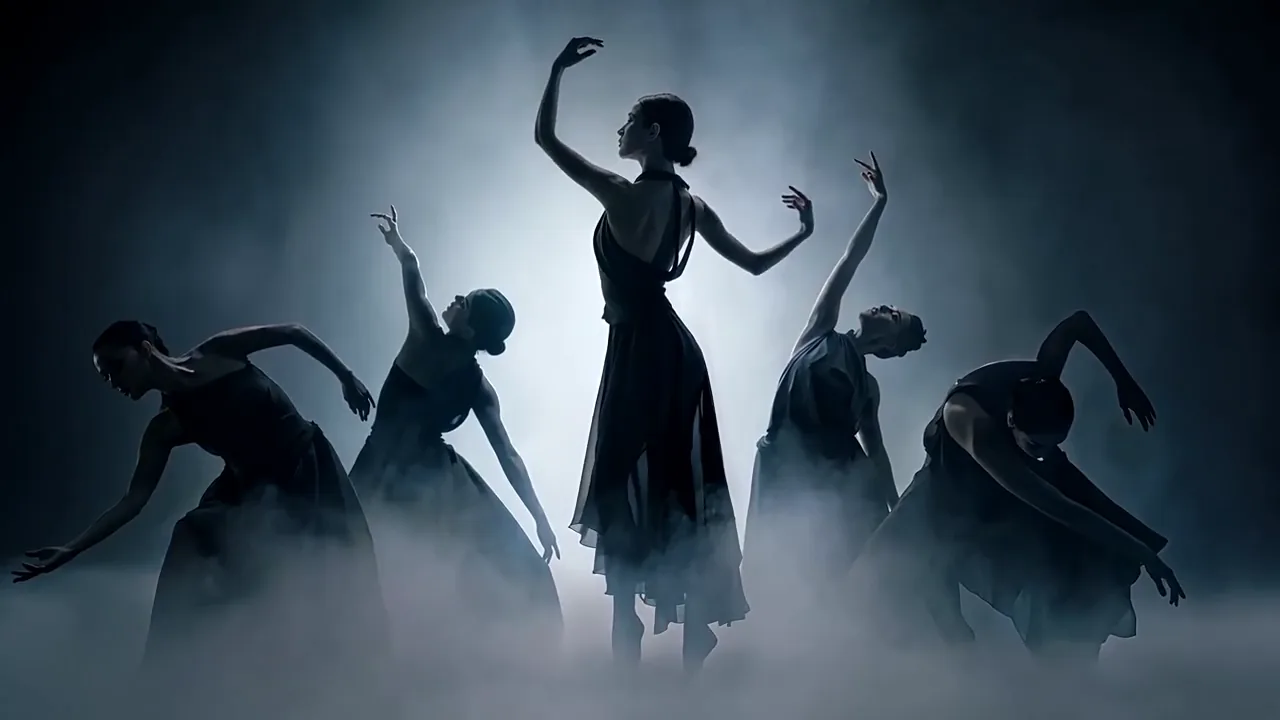
 12s · 16:9 · 720P
Dancers in backlit fog
What Wan 3.0 text to video actually gives you
Wan 3.0 text to video takes a written prompt of up to 20,000 characters and returns a single MP4 of 2 to 30 seconds at 30 fps, in 480P, 720P or 1080P, with speech, sound effects and music generated in the same pass. There is no separate audio step and no upscaling stage.
A woman walks down a street.
The model filled in the rest
- time of day?
- what she is wearing?
- where the light comes from?
- which way the camera moves?
- what it sounds like?
- how it ends?
 Wan 3.0 · 16:9 · 720P · 5s
Six answers you did not give, chosen for you. That is not the model being unhelpful — a prompt is a specification, and every question it leaves open is one Wan 3.0 has to close on its own. The room to answer them is the whole difference: 20,000 characters is far more than any shot needs, and the sound brief lives in the same field as the picture.
- Characters you can write
- 20,000
- Any whole number
- 2–30s
- Every tier
- 30 fps
- Resolutions: 480P · 720P · 1080P
- 3
- Picture and sound together
- 1 pass
Characters you can write
Any whole number
Every tier
Resolutions: 480P · 720P · 1080P
Picture and sound together
- No source image
- No separate audio step
- No upscaling stage
Five seconds and thirty seconds are
different Wan 3.0 prompts
This is the thing people get wrong first. A short Wan 3.0 clip wants one action described precisely. A long one wants beats in order — and if you leave the last third unaccounted for, the model fills it with whatever it likes. Three real clips below, one per length, with the prompt that made each.
5 seconds
one action
One subject, one action, one framing. Do not describe a change — there is no room to deliver one.
Holds
Three beats written into five seconds and the model picks the strongest. Ask for one and you get the one you asked for.
12 seconds
beats, in order
Two or three beats with the order stated. Then, after that, finally — connectives are the only scheduling grammar there is.
Resolves
Long enough that a shape can arrive, hold and leave. Short enough that a story would not fit — and **Wan 3.0** has no timecode grammar, so the order has to be words.
15 seconds
beats, plus an ending

Give every beat one job and write the last one down. An unplanned final third is the most common way a long clip goes wrong.
Lands
Four beats, and the fourth exists only so the model does not have to invent a way to stop.
The range runs from 2 to 30 seconds; these are the three we have shot. Drafting at 480P costs a quarter of 1080P for the same seconds, so find the length at 480P and spend the resolution once. Every prompt above is printed in full in prompt ideas.
Build a Wan 3.0 prompt from
Alibaba's own formula
Fill the boxes, watch the prompt assemble itself, send it straight to the generator.
Alibaba publishes the shape a Wan 3.0 prompt should take: entity, then scene, then motion, then aesthetic control, then stylization, with the sound written alongside. Most guides paraphrase that into prose. This fills it in — and none of the field names reach the model, because Wan 3.0 reads one plain paragraph and renders anything that looks like a label.
Order matters
Where the words go
Entity, scene, motion — what is happening
Who or what is in frame, where it is, and what moves.
- Entity
- Scene
- Motion
Write it in that order, as plain sentences. Describe the subject concretely enough to picture, give the place a time of day and a light source, and say what moves, how far and how fast. Stillness counts as an answer — a camera you never mention is a camera the model is free to move.
Aesthetic control, stylization — how it is shot
Shot size, camera move, lens, light — then a named look, if the shot needs one.
- Aesthetic control
- Stylization
One comma-separated clause carrying framing, the camera move with its size and speed, the lens and the light. Stylization goes last and is optional: a genre carries a whole grammar of coverage with it, so three words of it are worth a paragraph of description.
Sound — the same pass
Dialogue, effects, ambience, music — and the silences.
- Dialogue
- Effects
- Ambience
- Music
Wan 3.0 writes the audio alongside the picture, so this is a sound brief rather than an afterthought. Name the layers separately, put spoken lines in braces, and say what you do not want to hear — there is no negative prompt field, so "no music" is a sentence.
Assembled prompt, live
Entity, scene, motion
A courier in a soaked yellow jacket shoulders open a door into a narrow alley at night, neon spilling across wet brick.
Aesthetic control, stylization
Mid shot, the camera pushes in slowly, a small move, 35mm, shallow depth of field, hard practical light.
Sound
Rain on fabric and asphalt, a door hinge, distant traffic. No music.
0 / 7000
The boxes are the order we compose in. The labels never reach the model.
What Wan 3.0 does with it
- 01One plain string, up to 20,000 characters
- 02No field names, no shot markers, no timecodes
- 03Dialogue performed only inside {braces}
- 04Exclusions written as sentences, not a negative field
- 05Audio generated in the same pass, at the same price
Rather not write any of it? The prompt generator builds the whole thing from one line, free and with no counter. Or start from eleven prompts that already produced clips.
Name the camera move, get the feeling
Write cinematic and nothing happens — there is nothing in it to execute. Wan 3.0 wants a move, and it follows one much more closely when the move carries a size and a speed.
push in / pull out / tracking shot / arc shot / tilt up / pan across / static shot
a small move / a large move
slowly / quickly
It moves
slowly push in, a small move amplitude
cinematic camera work
Nothing to execute
starts with close-ups, then gently circles both playersA sequence, not a schedule. Starts with… then… is the whole grammar.rising slowly from ground level as the machine standsThe move is tied to the action, so it cannot desynchronise from it.a slow push in that stops before the centre dancer fills the frameA move with an end condition instead of a time. More robust than either.
Where the move happens
Past the duration you set — the model compresses rather than extends
The duration you set ends here
Wan 3.0 has no timecode grammar. Order comes from connectives — then, after that, finally — and the most reliable way to schedule a camera move is to attach it to an action rather than to a moment, because a move tied to an action compresses with it instead of drifting out of sync.
Already have footage you would rather restyle than rewrite? That is Wan 3.0 video editing. Need the same subject across several clips? Reference to video.
Writing dialogue and sound into
a Wan 3.0 prompt
Wan 3.0 generates the audio alongside the picture in the same request, which means the prompt field is also the sound brief — and it costs exactly the same whether you write it or not. Say nothing and you still get a soundtrack; it is simply one the model chose.
The anatomy of a spoken line
Same pass · no extra charge
 Sound written in three stages · 720P · 15s
Four layers, named separately
4
- Dialogue
- Effects
- Ambience
- Music
The rule people miss
There is no negative prompt field. Exclusions go inside the prompt as sentences, and silence is one of them — say "no music" and you get none, say nothing and you get whatever the model thought the scene deserved.
no music, no voice-overRightNegative prompt: music, voice-overWrong
Anything shaped like a negative prompt is read as words to render, and the request still succeeds — so the failure arrives as a finished clip with the words in it.
Need the same face or the same voice across several clips? Use reference to video — it carries up to ten images, five clips and five audio files in one request.
Wan 3.0 text to video specs,
and four traps
Every value below is Alibaba's own, and the date we last checked it sits at the foot of the table. Two of these four traps cost money the first time you meet them — the resolution default is the expensive one, and a missing ratio fails the request outright.


- 01Prompt length
- 20,000 charactersLonger input is truncated silently rather than refused
- Duration
- 2–30 s, whole secondsOne pass. Past thirty means a second clip and an editor
- Frame rate
- 30 fps
- 02Resolution
- 480P · 720P · 1080PDefaults to 1080P when unset — set it explicitly
- 4K
- Not supported
- Aspect ratio
- adaptive, 16:9, 4:3, 1:1, 3:4, 9:16Text to video needs a concrete ratio — adaptive has no picture to read one off
- Audio
- Generated in the same passOn or off, the price is identical
- Seed
- 0–2,147,483,647Fixes most of the variation, not all of it
Source: Alibaba Cloud Model Studio · Wan 3.0 text-to-video reference
The four things that trip people up
- 01
Resolution defaults to the most expensive tier.
- 480P
- 720P
- 1080P
- unset
Leave it out and Wan 3.0 generates — and bills — at 1080P. Draft at 480P, which is a quarter of the price for the same seconds, and spend the resolution once on the keeper.
- 02
There is no negative prompt field.
- no music
- no on-screen text
- no camera shake
- negative_prompt
Exclusions go inside the prompt as sentences. Anything formatted as a negative prompt arrives as words to render, and the request still returns 200 — so you pay for a clip with the words in it.
- 03
Reference numbering is case-sensitive.
- Image 1
- Video 1
- Audio 1
- image1
Capitalised, with a space, numbered per type in upload order. Lower case and underscores bind to nothing and the model quietly invents a subject instead. More on this in reference to video.
- 04
Smart duration hides the price.
- 3s
- 5s
- 15s
- 30s
- auto
Letting the model choose the length means the cost is unknown until it finishes. We bill an explicit duration instead, so the number on the button is the number that comes off.
What a Wan 3.0 text to video clip costs
Credits come off when the clip comes back, not when you press generate. A failed run costs nothing, refunded automatically without a ticket. Length and resolution are the only two things that move the bill — audio does not, aspect ratio does not, and neither does which plan you are on.
One 5-second clip, in credits
- 480P
- 40 credits
- 720P
- 80 credits
- 1080P
- 160 credits
Each tier doubles, and Wan 3.0 meters from the first second with no free floor, so a 15-second clip is three times its 5-second neighbour. The practical loop: find the shot at 480P, then run the keeper once at 1080P. The full credit table, and what a thirty-second clip costs.
Same monthly credits either way
- Free first clipNo card
One generation, once, on the real `wan3.0-video`. A sample rather than an allowance — every free second is cash spent before any arrives.
$0onceNo card at any point
Generate free clipAn email, no card
1 clip, once
480P · up to 3s · with sound
An email, no cardWan 3.0 has no free tier of its own — Alibaba meters it from the first second
- The real wan3.0-video, not 2.7
- Sound generated with the picture
- Model ID and task ID on the receipt
- A failed run never costs you
- 720P and 1080PPaid
- Clips longer than 3 secondsPaid
- Reference, document and editing modesPaid
- More than one clip, everPaid
Anyone advertising unmetered free access is either serving a different model or paying a bill that will not last.
At a glance
- Clips a month
- 1, once
- Takes per run
- 1
- Longest clip
- 3s
- Top resolution
- 480P
- StarterSave 50%
A launch post a week. Enough to find out whether the Wan 3.0 AI video generator suits the way you work, without a decision about volume.
$9.90/mo$19.80$118.80 billed yearly
Cancel anytime
480 credits / month · ≈ 12 clips
at 5s 480P · 6 at 720P · 3 at 1080P
Plan credits expire at the end of the month
- **480 credits a month** — about 12 finished clips
- 2 takes of one prompt per run
- Every resolution — 480P, 720P and 1080P
- Every length — 2 to 30 seconds in one pass
- Every input — text, image, reference, document, web page
- Sound written in the same pass, no watermark
- Commercial use included — publish it, sell it, bill for it
- Wan 3.0 Prime, the fast tier, whenever you want it
- A failed run never costs credits
- 7-day refund while the credits are untouched
- Cancel in two clicks — the price you joined at is locked
Everything under the first two lines is on this plan at $9.90. The bigger plans buy seconds and takes — never a better model.
At a glance
- Clips a month
- ≈ 12 at 5s 480P
- Takes per run
- 2
- Credits per dollar
- Baseline
- Refund window
- 7 days
- Most people land herePro
One finished clip every working day, with three alternates each. The draft-at-480P, finish-at-1080P loop, sized for a working week.
$29.90/mo$59.80$358.80 billed yearly
Cancel anytime
1,760 credits / month · ≈ 44 clips
at 5s 480P · 22 at 720P · 11 at 1080P
Plan credits expire at the end of the month
- **1,760 credits a month** — 3.7× Starter4×
- ≈ 44 finished clips a month, or 11 at full 1080P
- **4 takes of one prompt per run** — pick one instead of re-rolling2× takes
- **+32% credits per dollar** than StarterBetter rate
- Room to draft at 480P and finish at 1080P in the same week
- Every resolution — 480P, 720P and 1080P
- Every length — 2 to 30 seconds in one pass
- Every input — text, image, reference, document, web page
- Sound written in the same pass, no watermark
- Commercial use included — publish it, sell it, bill for it
- Wan 3.0 Prime, the fast tier, whenever you want it
- A failed run never costs credits
- 7-day refund while the credits are untouched
- Cancel in two clicks — the price you joined at is locked
The jump from Starter is quantity, takes and rate. The model, the resolutions and the thirty seconds were already yours.
At a glance
- Clips a month
- ≈ 44 at 5s 480P
- Takes per run
- 4
- Credits per dollar
- +32% vs Starter
- Refund window
- 7 days
- StudioBest rate
Client volume, and the plan where you stop rationing 1080P. Forty full-resolution finished clips a month, at the lowest credit price on this page.
$79.90/mo$159.80$958.80 billed yearly
Cancel anytime
4,960 credits / month · ≈ 124 clips
at 5s 480P · 62 at 720P · 31 at 1080P
Plan credits expire at the end of the month
- **4,960 credits a month** — 10× Starter, 2.8× Pro13×
- ≈ 124 finished clips a month, or **31 at full 1080P**
- **+65% credits per dollar** — the best rate on this pageBest rate
- Enough 1080P that you stop drafting at 480P first
- 4 takes of one prompt per run
- Sized for a client roster rather than one channel
- Top up any month without changing plan
- Every resolution — 480P, 720P and 1080P
- Every length — 2 to 30 seconds in one pass
- Every input — text, image, reference, document, web page
- Sound written in the same pass, no watermark
- Commercial use included — publish it, sell it, bill for it
- Wan 3.0 Prime, the fast tier, whenever you want it
- A failed run never costs credits
- 7-day refund while the credits are untouched
- Cancel in two clicks — the price you joined at is locked
Studio is volume and rate, nothing else. If you are not spending a month’s credits, Pro is the honest answer — we would rather write that here than take the difference.
At a glance
- Clips a month
- ≈ 124 at 5s 480P
- At full 1080P
- ≈ 40 a month
- Credits per dollar
- +65% vs Starter
- Refund window
- 7 days
Wan 3.0 text to video in three steps
Three steps, no editing app, no second pass for the audio. It arrives inside the same file as the picture because Wan 3.0 made them together.
Write the shot and the sound
One field takes both. Use the builder above if the blank box is the problem, and name one camera move rather than reaching for adjectives — the model responds to the move, not the mood.
Up to 20,000 charactersSet length and resolution
Two to thirty whole seconds. Draft at 480P: the framing you are testing does not need more, and it is the same Wan 3.0 at every tier — the resolution buys pixels, not a better model.
2–30s · 480P / 720P / 1080PDownload the MP4
Audio is already mixed in. Nothing to render afterwards, nothing to open.
One file, sound included
Around ninety seconds for a short clip; thirty seconds at 1080P takes longer. You can close the tab while it runs — the result is waiting when you come back, and a run that fails refunds itself.
Wan 3.0 text to video questions
Ten answers · all visible · nothing collapsed behind a click
What is Wan 3.0 text to video?
Do I have to sign up to try Wan 3.0 text to video?
How long can a Wan 3.0 text to video clip be?
How long can a Wan 3.0 prompt be?
Does Wan 3.0 text to video generate sound?
Is there a negative prompt in Wan 3.0?
How do I write dialogue?
Can I get 4K out of Wan 3.0 text to video?
Why did my clip ignore part of the prompt?
What happens if the generation fails?
One sentence is enough to find out.
Your first clip is on us — Wan 3.0 itself at 480P, up to three seconds, with sound. Not what you pictured? It cost you nothing, the builder is still open one screen up, and a failed run is never billed here at all.
Written and maintained by the wan-3.run editorial teamPublished Last updated