AI Product Video
You have the packshot. What you need is the product moving, lit, in a room your photographer never booked. Drop the photo in, name the parts that may not change, and Wan 3.0 generates the shot around it — sound included. Your first clip is free, an email and no card.
Two of Wan 3.0’s own published product runs, each printed with the whole prompt beside the clip it produced · Try this loads the prompt
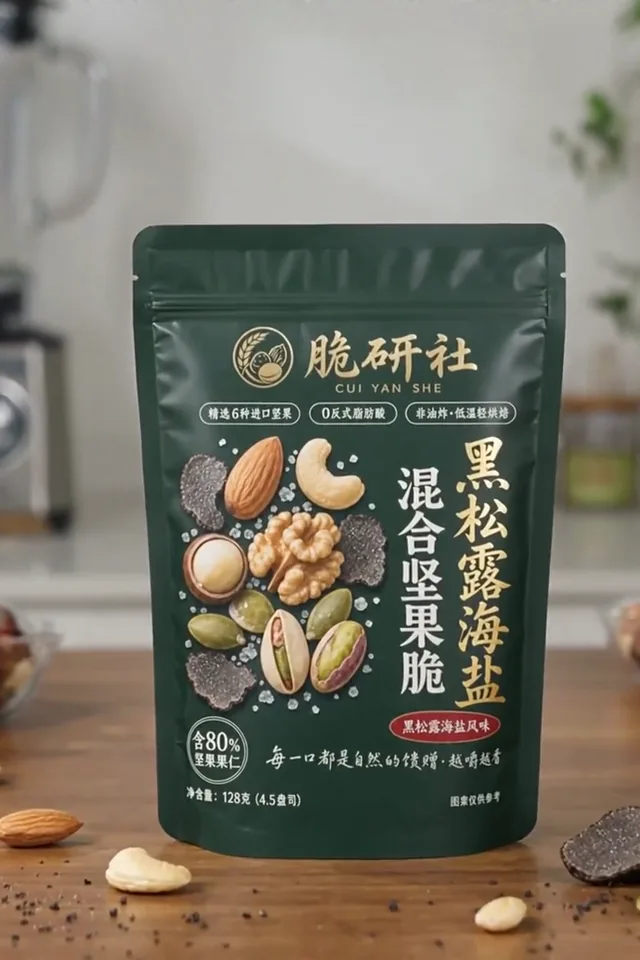
 THREE SHOTS · PACK COPY LEGIBLE · 2:3
A packshot walked round, with the small print still readable
An AI product video
generates footage. It does not edit your photos.
Most tools sold under this phrase cut your existing images against a template. This one shoots something that never existed, around the product you supplied. Knowing which you are buying saves an afternoon.

Your packshot
Generated around it — the room, the light, the hands, the sound
Your photograph becomes the literal first frame, so the product is on screen in frame one at the shape and colour you shot it. From there Wan 3.0 generates 2 to 30 seconds at 30 fps — the figures are published in Alibaba's API reference — and it generates the whole frame: the room, the light, a hand entering, the surface it stands on, and the audio, all in the same pass. Nothing is composited, nothing is a Ken Burns pan across a JPEG, and nothing else in the frame had to exist before you pressed generate.
- Your product, unretouched
- Frame 001
- Any whole second, at 30 fps
- 2–30 s
- Ratio read from your packshot
- Adaptive
- Commercial use, every paid plan
- Included
Your product, unretouched
Any whole second, at 30 fps
Ratio read from your packshot
Commercial use, every paid plan
- It is not a slideshow — your other photographs are not lifted into the cut
- It is not a 3D turntable — there is no model of your product, so the far side is invented
- It is not a catalogue pipeline — one product, one prompt, one clip. A thousand SKUs is not this
- It does not remember your product between runs; the packshot goes with every request
Three things sold as product video, and which one this is
They cost different amounts, take different amounts of time, and break in completely different places. Most people discover which one they bought after the first delivery.
Tabletop shoot
- What you supply
- The physical product, a studio and a day
- Turnaround
- Days to weeks
- What it is good at
- Legally exact. Every reflection is real
- Where it breaks
- Cost, scheduling, and one more shot means one more booking
- Choose this when
- The label has to be readable and correct in a regulated market
Nothing here replaces a real shoot for a regulated claim. That is the honest answer.
Asset-lift template
- What you supply
- Your existing photographs and a script
- Turnaround
- Minutes
- What it is good at
- Cutting what you already have, on beat
- Where it breaks
- It can only show what you already photographed
- Choose this when
- You have a full asset library and need it assembled
If your photo library is already complete, a template editor is faster than this and cheaper.
Generated footage
- What you supply
- One packshot and a sentence
- Turnaround
- About ninety seconds
- What it is good at
- Scenes, moods and moments you never shot and could not afford to
- Where it breaks
- Approximate rather than exact — it holds a design, it does not guarantee a pixel
- Choose this when
- You need a shot that does not exist and cannot book a studio to get it
This page. Upload the packshot at the top; the first clip is free.
The line between the first and the third is not quality, it is provenance. A shoot produces a photograph of your product. Generation produces a convincing depiction of it. For a hero loop, a social cut or a lifestyle scene, convincing is what the brief asked for — and for a claim a regulator will read, it is not.
A photo of the product,
or the page that sells it
Most tools on this shelf take one input. Wan 3.0 takes either — and they are not the same job, so which one you hand it decides what comes back.
A packshot becomes the first frame: the clip opens on your actual product and moves from there, which is the route to take when the label, the shape and the colour have to survive the shot. A product page is read rather than shown — Wan 3.0 takes the claims and the tone off the page and generates new footage around them, and nothing from the page itself appears in the clip. The link is the route when the product is still a listing and not yet a photo shoot.
01
You have the packshot
Use the box at the top of this page. One photograph is the whole input, and it becomes the first frame rather than a slide.
02
You have only the listing
URL to video takes the address instead and reads the page behind it. Nothing is lifted off the page — the footage is new.
03
Check the link before you spend
The check is free and needs no account. It names the one thing that would have failed, including the hop this site cannot make on your behalf.
Both routes run the same wan3.0-video at the same per-second rate, so the choice is about what you already have rather than what it costs.
Check a link reports what a plain fetch actually sees — and, since 2026-09-14, whether the model's own network has been measured refusing that host. Those are two different networks, and only the second one renders.
Five ways a product video comes back unusable
Every one of these turns up on somebody's first packshot. Four are fixed by a sentence; the fifth is a decision about what you are willing to publish.
The label turns into a smear of letters
Small high-contrast type is the first thing to go, and it goes fastest while the camera moves
Lock the label explicitly, keep the camera slow, and shoot at 720P or above. For type that must be legally correct, composite the real label in afterwards
Read the frame before publishingThe shape changes as it turns
There is no 3D model. The far side of your product was never photographed, so it is invented as it comes into view
Keep the rotation under a quarter turn, or supply a second reference from the other side. A full 360 is what a real turntable is for
One sentenceGlass and metal look like plastic
Material words are weak. "Premium" and "luxury" mean nothing to the model; a finish does
Name the finish and the light together: "ribbed clear glass, single soft key from the left, no specular blowout"
One sentenceThe hand holding it looks wrong
Hands are the classic failure and they get worse the closer the crop
Frame wider, or write the product alone on the surface. If a hand is essential, say what it does — "one hand lifts the lid and leaves frame" — rather than leaving it to improvise
Shot three does not match shot one
Every generation is independent. Nothing about your product carries from one request to the next
Send the same reference set every time — up to ten images. Reference to video is the mode for a full set of PDP shots
A run that fails outright is refunded automatically. The five above do not fail — they come back finished and wrong, and those are billed. That is the argument for drafting at 480P: an iteration that teaches you something costs a quarter of a keeper.
What a product video costs
against the shoot it replaces
The comparison that matters is not against another AI tool, it is against a half-day of studio time. Budget three or four generations for a hero shot that has to look right — first a draft, then the thing that slipped added to the clause, then the keeper. A failed run is refunded automatically, audio costs nothing extra, and commercial use is included on every paid plan and every credit pack.
How this is billed
- Billed by
- output second
- Commercial use
- included
- Failed generation
- refunded
- Your first clip
- free · 480P
Find the move at 480P, then run the keeper once at 720P or 1080P — labels and fine detail need the higher tier, motion tests do not. Full pricing.
어느 쪽이든 월 크레딧은 같습니다
How to make an AI product video
from one photo
Four steps. The second is the one that separates a usable clip from a pretty clip of something that is not quite your product.
Upload the cleanest packshot you have
Plain background, even light, product filling the frame. The checker confirms the file in a second, and a clean input leaves the model less to reinterpret.
Checked freeName the parts that may not change
"Gold foil label, ribbed clear glass, matte black cap." Nouns and finishes, not adjectives — the appearance box at the top builds the clause for you.
The step that decides itDescribe the move and the light, not the product
The model can see the product. Say what the camera does, where the key light is, what enters frame, and what it sounds like.
Sound in the same fieldDraft at 480P, commit at 1080P
Check the label and the silhouette, add whatever slipped to the clause, run again. Re-run the keeper at the higher tier with the same prompt.
Up to 1080P
Need somebody on camera holding it instead of the product alone? The UGC ad generator puts a creator, your packshot and the spoken line in the same generation, vertical by default.
Need the same product across a whole set of PDP shots rather than one hero? Photograph it from every angle the set needs and send that group with each generation — reference to video takes up to ten.
AI product video questions
What it does with your packshot, whether the label survives, what it costs, and whether you can sell the result
Does it use my product photos, or generate new footage?
Can it make videos for my whole catalogue?
Will the label and logo stay readable?
Can it do a full 360° turntable of my product?
Can I use the clip in a paid ad?
What kind of packshot works best?
Can I get several matching shots for one product page?
How many runs does one usable hero shot take?
Can I test it on my own product before paying?
One packshot. The shot you could not book.
Upload the photo, name what may not change, and see your product moving in ninety seconds. First clip free at 480P — an email, no card — and commercial use is included the moment you pay for anything at all.
wan-3.run 편집팀이 쓰고 관리합니다게시 최종 수정 도구 버전 2026.09.4