AI Mascot Video
You already have the character. Somebody drew it, legal approved it, and it is on the packaging — and now it has to move and say something. Upload the sheet, name the colours that may not change, and Wan 3.0 generates the shot with the voice already in it. Your first clip is free — an email, no card.
Two of Wan 3.0’s own published character runs, each printed with the whole prompt beside the clip it produced · Try this loads the prompt
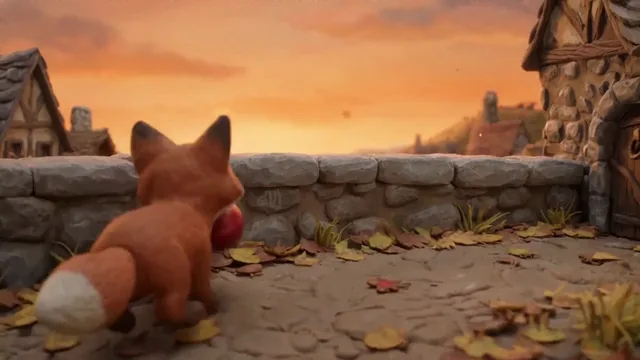
 ONE CHARACTER · SEVEN BEATS · 15s
A clay mascot carried through seven beats without a cut
What an AI mascot video
actually generates
It animates the character you already own. It does not invent one, and that distinction decides whether this page is any use to you.

Your character sheet
Generated around it, in one pass, with the voice included
Upload the sheet, the render or the packshot your mascot lives on. It becomes the literal first frame, so the design is on screen from frame one rather than being described and re-imagined. Name the colours and proportions that may not move, quote the line it should say, and Wan 3.0 returns 2 to 30 seconds at 30 fps with the speech mixed into the same MP4 — no voice actor, no separate audio file, no rig. Those figures are the model's rather than ours, and they are published in Alibaba's API reference.
- Your mascot, unretouched
- Frame 001
- The line it speaks
- In-prompt
- Per shot, at 30 fps
- 2–30 s
- Typical wait for a short clip
- ≈ 90 s
Your mascot, unretouched
The line it speaks
Per shot, at 30 fps
Typical wait for a short clip
- It will not design a mascot for you — bring the artwork you already have
- It is not a rig: there are no bones, no keyframes and nothing to re-pose afterwards
- There is no transparent export — what comes back is an opaque MP4, never a WebM with alpha
- It does not remember your character between generations — the sheet goes with every request
Three things sold as mascot video, and which one this is
The three cost different amounts, take different amounts of time, and fail in completely different ways. Most people find out which one they bought after the invoice.
Studio 3D rig
- What you have to supply
- A modelled, rigged character and an animator
- Turnaround
- Weeks, per scene
- What it is good at
- Exact repeatability, any pose, any length
- Where it breaks
- Cost and lead time; a one-line change is a new booking
- Choose this when
- The mascot is a long-running property with a style guide to defend
Nothing on this site replaces a rig. If frame-exact repeatability is the requirement, that is the honest answer.
Avatar template tool
- What you have to supply
- A script, and a character from their library
- Turnaround
- Minutes
- What it is good at
- Talking heads at volume
- Where it breaks
- It is their character, not yours — your mascot is not in the library
- Choose this when
- You need a presenter, and it does not have to be your IP
If a generic presenter will do, an avatar tool is faster than this and you should use one.
Generated footage
- What you have to supply
- One image of your mascot, and a sentence
- Turnaround
- About ninety seconds
- What it is good at
- Your own character, moving and speaking, in a scene that never existed
- Where it breaks
- Approximate rather than exact — it holds a design, it does not guarantee a pixel
- Choose this when
- You own the artwork and need shots, not a rebuild
This page. Upload the sheet at the top and the first clip is free.
The honest line between the first and the third: a rig gives you the same mascot every time, and generation gives you a convincing one. For a product explainer, a social cut or an internal safety film, convincing is what the brief actually needed.
One mascot shot is easy. Twelve that match is the real project
Both are possible here, and they use different machinery. Starting with the wrong one is the mistake that costs an afternoon.
 first_frame + clause
A single shotThis pageThe character sheet as the first frame, plus the appearance clause. Everything happens in one generation, so the design only has to survive 2–30 seconds. Start here even if the film is long — you are testing whether the mascot reads well in motion at all. reference_image ×10
A whole filmReference to videoPhotograph or render the finished mascot from every angle the film needs — up to ten images — and send that same set with every generation. A two-minute piece is twelve to twenty separate requests, and the set is the only thing holding them together. References cannot be combined with a first frame in one request.
A single shot where the mascot drifts is a clause problem, and character consistency is the page that solves it — how the clause is built, what it holds, and what it does not.
Twelve shots that each look fine alone but do not match each other is a reference problem, and no clause fixes it: the model never saw shot four when it made shot five. Reference to video is where that set lives. If the mascot has to talk, lip sync performs the line written in the prompt, so the mouth is one less thing to supervise.
Five ways a mascot video comes back wrong
None of these is exotic. Every one of them shows up on somebody's first real mascot project, and four of the five are fixed by a sentence.
The colour shifts halfway through
The prompt described what the mascot does and never said the palette was fixed, so it was free territory
Add the appearance clause with the colours named as nouns — "forest-green shell, dusty-rose scarf" — using the box in the generator above
One sentenceIt stops looking like a mascot and starts looking like a person
Chibi and stylised proportions drift towards realistic ones over a long shot, because realism is what the model has most of
State the proportion as a measurement: "about three heads tall", "matte vinyl finish, no specular highlights". Vague style words drift; measurements hold
One sentenceThe logo on its chest turns into a smudge
Small high-contrast marks are the first thing to go, especially while the camera moves
Lock the mark explicitly and keep the camera still for that shot. If the logo must be legally exact, composite it in afterwards rather than generating it
Read the frame before publishingThe mouth moves when it should not, or does not when it should
Speech is inferred from the prompt. Text that reads like dialogue makes it talk even when you meant narration
Quote the spoken line inside quotation marks, and write "no talking, closed mouth" when the shot is silent. Lip sync is the page for the talking version
Shot five does not match shot four
There is no memory between generations. Each request starts from whatever you sent it
Move to a reference set — up to ten images of the mascot, resent every time. Reference to video
A failed generation is refunded automatically, no ticket. The ones above are not failures though — they come back as a finished clip that is simply wrong, and those are billed. That is the whole argument for drafting at 480P: an iteration that teaches you something costs a quarter of a finished one.
What a mascot video costs
— including the runs that miss
Budget three or four generations per shot that has to match something. The first is a draft, the second adds the thing that drifted to the clause, the third is usually the keeper. That is the real number, and it is the one a feature list never gives you. A failed run is refunded automatically, and audio costs nothing extra — a talking mascot is the same price as a silent one.
How this is billed
- Billed by
- output second
- Spoken lines
- no extra cost
- Failed generation
- refunded
- Your first clip
- free · 480P
Find the performance at 480P, then run the keeper once at 720P or 1080P with the same prompt. Full pricing.
الأرصدة الشهرية نفسها في الحالتين
How to make an AI mascot video
from a character sheet
Four steps. The one people skip is the second, and it is the one that decides whether the mascot survives to the end of the shot.
Upload the sheet you already have
A front-on render, a character sheet or a packshot. Plain background beats a busy scene — the model has less to interpret and your mascot stays the subject.
Checked freeName the colours and proportions that cannot move
Nouns and measurements, not adjectives. "Forest-green matte shell, three heads tall, gold badge on the left" holds. "Cute and consistent" does not.
The step that decides itWrite the action, and quote the line
Say what the mascot does and put the spoken words in quotation marks. The voice is generated in the same pass — there is nothing to record and nothing to sync afterwards.
Sound in the same fieldDraft at 480P, then commit once
Watch what drifted, add it to the clause, run again. When the design holds, re-run the same prompt at 720P or 1080P for the keeper.
Up to 1080P
Writing in Japanese, Chinese or Korean? Put the spoken line in your own language and keep the appearance clause in English — that combination is what the accounts producing branded work here actually use, and it holds.
AI mascot video questions
What you have to supply, what holds across shots, what it costs, and who owns the result
Can it use my existing mascot, or does it invent one?
Can the mascot speak, and do I need a voice recording?
Can I get the mascot on a transparent background?
Will the mascot look the same in every shot?
How long can a mascot clip be?
My mascot is chibi or flat-illustrated. Does that work?
How many runs does one usable mascot shot take?
Can I use a mascot video commercially?
Do I have to label a mascot video as AI-generated on YouTube?
Can I try it before paying?
Your mascot has been standing still long enough
One character sheet, one sentence about what may not change, and one line for it to say. Ninety seconds later you will know whether Wan 3.0 can carry your character. First clip free at 480P, an email and no card.
كتبه ويحافظ عليه فريق التحرير في wan-3.runنُشر في آخر تحديث إصدار الأداة 2026.09.4